It's been a while since I've blogged something. I've just been busy!
It will actually use a UDF and check constraints to mimic a foreign key constraint, but it will enforce referential integrity against more than one table.
Some of my developers need to save records to a table from values retrieved from and referenced by one other table. This is, of course, nothing more than a foreign key constraint. Simple enough.
Now, they need to save two more special-case values, but cannot add them to the reference table. You'll see why in a minute.
(Explaining the real scenario would require getting you bogged down in far more details than what I actually implemented, so please allow me to contrive a story for the purposes of greatly shortening things.)
Users work for a company that makes combination locks for toddlers. (I have a 16-month old, so I guess that's part of where I got the idea from. Roll with me, here.) They have a search dialog box. In the search dialog, they have select lists for a weird combination lock with colors as the combination. The lock has 3 positions. For example, a lock could have red-green-blue.
The current search dialog looks for customers with specific color combinations in those three positions.
For business reasons, you have to save each search to a separate table, called LockSearchHistory. That LockSearchHistory has foreign key constraints against a table called ColorList. There are three FK constraints, one for each position.
Now, the company has invented a new lock with 4 positions: Example: orange-blue-yellow-black.
And now, they want to modify the search dialog for all customers, regardless of if it's a 3 position or 4 position lock, and users want to specify the position of only the colors they know.
In other words, for a 3-position lock, they want to search for: (any color)-green-blue-(no color).
For a 4-position lock, they want to search for: orange-(any color)-(any color)-black.
You still have to save each search to the LockSearchHistory table.
You definitely don't want to add "any color" and "no color" values to your ColorList table, because then users might accidentally enter them when adding new customer locks. I suppose you could add "any" and "none" with some kind of flags, but that requires more application and schema changes than just a search dialog box should need. (There will be application and schema changes, just smart ones.)
Here's (what I think is) an elegant solution, step-by-step.
1. Delete the three current foreign key constraints, one for each position:
if exists (select * from sys.foreign_keys where object_id = object_id(N'[dbo].[FK_LockSearchHistory_PositionOne]') and parent_object_id = object_id(N'[dbo].[LockSearchHistory]'))
alter table LockSearchHistory drop constraint FK_LockSearchHistory_PositionOne
go
if exists (select * from sys.foreign_keys where object_id = object_id(N'[dbo].[FK_LockSearchHistory_PositionTwo]') and parent_object_id = object_id(N'[dbo].[LockSearchHistory]'))
alter table LockSearchHistory drop constraint FK_LockSearchHistory_PositionTwo
go
if exists (select * from sys.foreign_keys where object_id = object_id(N'[dbo].[FK_LockSearchHistory_PositionThree]') and parent_object_id = object_id(N'[dbo].[LockSearchHistory]'))
alter table LockSearchHistory drop constraint FK_LockSearchHistory_PositionThree
go
2. Add a new column to the LockSearchHistory table, say, called "PositionFour".
3. Create a new table, "ListNoneAny," with "*no color*" and "*any color*" values.
4. Create a user-defined function (UDF), called "InColorListOrListNoneAnyFN":
create function dbo.InColorListOrListNoneAnyFN (@strColor varchar(50))
returns bit as
begin
declare @bitReturn bit=0
if exists(
select 1 from ColorList where PositionOne=@strColor
union
select 1 from ColorList where PositionTwo=@strColor
union
select 1 from ColorList where PositionThree=@strColor
union
select 1 from ColorList where PositionFour=@strColor
union
select 1 from ListNoneAny where Title=@strColor
) set @bitReturn=1
return @bitReturn
end
5. Add four check constraints, one for each position:
alter table LockSearchHistory with nocheck
add constraint CK_LockSearchHistory_PositionOne check ((dbo.InColorListOrListNoneAnyFN(PositionOne))=1)
go
alter table LockSearchHistory check constraint CK_LockSearchHistory_PositionOne
go
alter table LockSearchHistory with nocheck
add constraint CK_LockSearchHistory_PositionTwo check ((dbo.InColorListOrListNoneAnyFN(PositionTwo))=1)
go
alter table LockSearchHistory check constraint CK_LockSearchHistory_PositionTwo
go
alter table LockSearchHistory with nocheck
add constraint CK_LockSearchHistory_PositionThree check ((dbo.InColorListOrListNoneAnyFN(PositionThree))=1)
go
alter table LockSearchHistory check constraint CK_LockSearchHistory_PositionThree
go
alter table LockSearchHistory with nocheck
add constraint CK_LockSearchHistory_PositionFour check ((dbo.InColorListOrListNoneAnyFN(PositionFour))=1)
go
alter table LockSearchHistory check constraint CK_LockSearchHistory_PositionFour
go
Now, you effectively have a foreign key constraint that references more than one table.
In closing, when tweeting #sqlhelp about my problem, Brent Ozar himself suggested using indexed views. But, indexed views don't allow unions. Because of this, I think he assumed that the view would use a join. So, the only way was with a UDF and check constraints. I am only saying this because I googled a ton, and found several suggestions and examples to use indexed views for this sort of thing.
Thursday, October 27, 2011


Friday, June 17, 2011
Run SSMS under a different domain account, or a SQL Server service account
Do you want a way to log in to your workstation, yet connect to your SQL Server instances using different domain accounts, too? I do this ALL the time.
At work, I have several types of logins I use often: my "normal" account, my "admin" account, and SQL Server service accounts.
I have higher access using my admin account than my normal account, but for security reasons I like to minimize the time I use it. SQL Server service accounts are a good way of controlling exactly who (or what) can run SQL processes, and sometimes I want to log in as that service account to verify what it can see and do. It's also handy when I want to verify that an instance it's connecting to on a different server (i.e., using a linked server) has read-only rights on the separate server (db_datareader).
I use these commands CONSTANTLY in my workplace:
"runas /profile /user:domain\adminaccount ssms.exe"
"runas /profile /user:domain\sqlserverserviceaccount ssms.exe"
The runas command asks for the password to the account, then attempts to launch the executable.
I had to blot out a lot for security reasons, but I think you'll get the idea.
Running under my normal login account:

I need to run SSMS and connect with a higher-privileged account:


I want to log in as my SQL Server service account:


At work, I have several types of logins I use often: my "normal" account, my "admin" account, and SQL Server service accounts.
I have higher access using my admin account than my normal account, but for security reasons I like to minimize the time I use it. SQL Server service accounts are a good way of controlling exactly who (or what) can run SQL processes, and sometimes I want to log in as that service account to verify what it can see and do. It's also handy when I want to verify that an instance it's connecting to on a different server (i.e., using a linked server) has read-only rights on the separate server (db_datareader).
I use these commands CONSTANTLY in my workplace:
"runas /profile /user:domain\adminaccount ssms.exe"
"runas /profile /user:domain\sqlserverserviceaccount ssms.exe"
The runas command asks for the password to the account, then attempts to launch the executable.
I had to blot out a lot for security reasons, but I think you'll get the idea.
Running under my normal login account:
I need to run SSMS and connect with a higher-privileged account:
I want to log in as my SQL Server service account:

Thursday, January 27, 2011
TSQL - Auto-create Alerts
SQL Server alerts are a great way to keep tabs on specific performance values in your databases. However, they must be created on a per-value and per-database basis. We DBAs always manage not only lots of databases, but lots of sql server installations (instances), and we add (and sometimes drop) databases, too. So, managing alerts can be a pain because they do not scale.
This TSQL code, hopefully, will make your life a lot easier.
Quick-install Instructions:
1. Make sure Database Mail is set up.
2. Change the code with SQL Server admin emails you want to be alerted.
3. Execute the code once per instance.
The code will create an SP in the MSDB system database, called autocreate_alerts. autocreate_alerts will delete and re-create alerts for each database in that instance. The nice part is that autocreate_alerts will also execute monthly. This means you won't have to do anything new if you add and drop databases from that instance. This code will only re-create alerts with an "-autocreated-" prefix, so it won't touch any alerts you've already created.
Disclaimer #1: If you add or delete an email from the alert list, you will have to re-execute the code on each instance again.
Disclaimer #2: This code works only with Database Mail. It does not work with the older SQL Mail.
This code runs on both SQL Server 2005 and 2008.
I've chosen alerts that were of interest to me. I've made the code as clear as possible, but if you want more alerts, you'll need to study it.
--
-- Execute this code on each SQL server instance.
-- This code creates (and re-creates) specific alerts.
-- This code runs on SQL 2005 and SQL 2008.
-- This code does not work on SQL 2000 or earlier, because it uses
-- SQL Mail (old and busted) and it cannot use Database Mail (new hotness).
-- If Database Mail has not yet been set up, this code will let you know,
-- then halt.
-- If you add operators or alerts, re-run this code to delete the old alerts and
-- re-create them.
-- This code auto-detects databases monthly. You don't need to re-run this
-- code if you add or drop databases.
-- Requirements:
-- You must set up Database Mail, and create a mail profile.
-- You must select a mail profile from within SQL Server Agent properties.
--
use [msdb]
go
-- make sure Database Mail is ready
declare @strDBMailProfile varchar(150)
declare @strHaltError varchar(250)
exec master.dbo.xp_instance_regread
N'HKEY_LOCAL_MACHINE'
,N'SOFTWARE\Microsoft\MSSQLServer\SQLServerAgent'
,N'DatabaseMailProfile'
,@strDBMailProfile output
,N'no_output'
if @strDBMailProfile is null
begin
set @strHaltError='A Database Mail profile has not been enabled. '
set @strHaltError=@strHaltError+ 'Set up Database Mail, then right click '
set @strHaltError=@strHaltError+ 'SQL Server agent / properties / '
set @strHaltError=@strHaltError+ 'alert system / enable mail profile.'
print @strHaltError
select @strHaltError as AbortMessage
return
end
go
-- drop and re-create the SP
if exists(select * from sys.objects where object_id=object_id(N'[dbo].[autocreate_alerts]'))
begin
drop procedure [dbo].[autocreate_alerts]
end
go
create procedure [dbo].[autocreate_alerts]
as
-- declare a few tables
declare @tblExcludeDatabases table (
IDExcludeDatabases int identity(1, 1)
,servername varchar(150)
,dbname varchar(150)
)
declare @tblOperators table (
IDOperators int identity(1, 1)
,email varchar(150)
,active bit default 1
)
declare @tblAlertDBCode table (
IDAlertDBCode int identity(1, 1)
,name varchar(250)
,code varchar(2000)
,skip_simplerecoverymodel bit not null
,active bit default 1
)
declare @tblAlertInstanceCode table (
IDAlertInstanceCode int identity(1, 1)
,name varchar(250)
,code varchar(2000)
,active bit default 1
)
declare @tblOperatorDBCode table (
IDOperatorDBCode int identity(1, 1)
,name varchar(250)
,code varchar(2000)
,active bit default 1
)
declare @tblOperatorInstanceCode table (
IDOperatorInstanceCode int identity(1, 1)
,name varchar(250)
,code varchar(2000)
,active bit default 1
)
-- exclude these add servers and databases
-- set the servername to '%' to indicate all servers
-- exclude master, msdb, model and tempdb for all servers
insert into @tblExcludeDatabases (servername, dbname) values ('%', 'master')
insert into @tblExcludeDatabases (servername, dbname) values ('%', 'msdb')
insert into @tblExcludeDatabases (servername, dbname) values ('%', 'model')
insert into @tblExcludeDatabases (servername, dbname) values ('%', 'tempdb')
-- email these operators
-- ADD SQL SERVER ADMINS TO THE @tblOperators TEMPORARY TABLE
insert into @tblOperators (email) values ('sql_server_admin_1@organization.com')
insert into @tblOperators (email) values ('sql_server_admin_2@organization.com')
insert into @tblOperators (email) values ('sql_server_admin_3@organization.com')
-- per DB alert - percent log used alert
declare @strPercentLogUsed_Name varchar(2000)
set @strPercentLogUsed_Name=
'-autocreated-{database}:sql server:databases:% log used>75'
declare @strPercentLogUsed_AddDBAlert varchar(2000)
set @strPercentLogUsed_AddDBAlert=
'exec msdb.dbo.sp_add_alert
@name=QQ{name}QQ
,@message_id=0
,@severity=0
,@enabled=1
,@notification_message=QQThe Percent Log Used performance counter is the percentage of transaction log file space in use. All work in a database halts until the transaction log is written to, and itQQQQs recommended to not allow the log to exceed 80%.QQ
,@delay_between_responses=43200 -- seconds
,@include_event_description_in=1
,@category_name=QQ[Uncategorized]QQ
,@performance_condition=QQSQLServer:Databases|Percent Log Used|{database}|>|75QQ'
declare @strPercentLogUsed_AddDBNotification varchar(2000)
set @strPercentLogUsed_AddDBNotification=
'exec msdb.dbo.sp_add_notification
@alert_name=QQ{name}QQ
,@operator_name=QQ{email}QQ
,@notification_method = 1'
-- instance alert - free pages alert
declare @strFreePages_Name varchar(2000)
set @strFreePages_Name=
'-autocreated-sql server:buffer manager:free pages<640' declare @strFreePages_AddInstanceAlert varchar(2000) set @strFreePages_AddInstanceAlert= 'exec msdb.dbo.sp_add_alert @name=QQ{name}QQ ,@enabled=1 ,@delay_between_responses=43200 -- in seconds ,@notification_message=QQThis indicates the total number of free pages. Less than 640 pages (5 meg) indicates physical memory pressure.QQ ,@include_event_description_in=1 ,@performance_condition=QQSQLServer:Buffer Manager|Free pages||<|640QQ' declare @strFreePages_AddInstanceNotification varchar(2000) set @strFreePages_AddInstanceNotification= 'exec msdb.dbo.sp_add_notification @alert_name=QQ{name}QQ ,@operator_name=QQ{email}QQ ,@notification_method = 1' declare @strLockRequests_Name varchar(2000) set @strLockRequests_Name= '-autocreated-sqlserver:locks:lock requests/sec:object>1000'
declare @strLockRequests_AddInstanceAlert varchar(2000)
set @strLockRequests_AddInstanceAlert=
'exec msdb.dbo.sp_add_alert
@name=QQ{name}QQ
,@enabled=1
,@delay_between_responses=43200 -- seconds
,@notification_message=QQThis indicates the number of new locks and locks converted per second. Values > 1000 may indicate queries are accessing very large numbers of rows and may benefit from tuning.QQ
,@include_event_description_in=1
,@performance_condition=QQSQLServer:Locks|Lock Requests/sec|Object|>|1000QQ'
declare @strLockRequests_AddInstanceNotification varchar(2000)
set @strLockRequests_AddInstanceNotification=
'exec msdb.dbo.sp_add_notification
@alert_name=QQ{name}QQ
,@operator_name=QQ{email}QQ
,@notification_method = 1'
-- add operator
declare @strAddOperator varchar(2000)
set @strAddOperator=
'exec msdb.dbo.sp_add_operator
@name=QQ{email}QQ
,@enabled=1
,@email_address=QQ{email}QQ
,@category_name=QQ[Uncategorized]QQ'
-- insert to alert per DB
insert into @tblAlertDBCode (name, code, skip_simplerecoverymodel) values (@strPercentLogUsed_Name, @strPercentLogUsed_AddDBAlert, 0)
-- insert into tables to alert each operator per DB
insert into @tblOperatorDBCode (name, code) values (@strPercentLogUsed_Name, @strPercentLogUsed_AddDBNotification)
-- insert to alert for the instance
insert into @tblAlertInstanceCode (name, code) values (@strFreePages_Name, @strFreePages_AddInstanceAlert)
insert into @tblAlertInstanceCode (name, code) values (@strLockRequests_Name, @strLockRequests_AddInstanceAlert)
-- insert into tables to alert each operator for the instance
insert into @tblOperatorInstanceCode (name, code) values (@strFreePages_Name, @strFreePages_AddInstanceNotification)
insert into @tblOperatorInstanceCode (name, code) values (@strLockRequests_Name, @strLockRequests_AddInstanceNotification)
-- begin code here --
declare @tblDBs table (
ID int identity(1, 1)
,dbname varchar(150)
)
declare @tblAlerts table (
alertname varchar(150)
)
declare @strAlert varchar(150)
declare @strDB varchar(150)
declare @strName varchar(250)
declare @strCommand varchar(2000)
declare @strOperator varchar(150)
declare @intIDAlertDBCode int
declare @intIDOperatorDBCode int
declare @bolSkip_SimpleRecoveryModel bit
declare @bolSkipThisDB bit
declare @intIDOperator int
declare @intIDAlertInstanceCode int
declare @intIDOperatorInstanceCode int
declare @strEmail varchar(150)
while exists(select * from @tblOperators where active=1)
begin
select top 1 @strOperator=email from @tblOperators where active=1
update @tblOperators set active=0 where email=@strOperator
if not exists(select [name] from msdb.dbo.sysoperators where [name]=@strOperator)
begin
set @strCommand=@strAddOperator
set @strCommand=replace(@strCommand, 'QQ', '''')
set @strCommand=replace(@strCommand, '{email}', @strOperator)
exec(@strCommand)
while not exists(select * from msdb.dbo.sysoperators where [name]=@strOperator)
begin
set @strOperator=@strOperator
end
end
end
insert into @tblAlerts (alertname)
select [name] from msdb.dbo.sysalerts
where [name] like '-autocreated-%'
while exists(select * from @tblAlerts)
begin
select top 1 @strAlert=alertname from @tblAlerts
delete from @tblAlerts where alertname=@strAlert
set @strCommand='exec msdb.dbo.sp_delete_alert @name=QQ'+@strAlert+'QQ'
set @strCommand=replace(@strCommand, 'QQ', '''')
exec(@strCommand)
while exists(select * from msdb.dbo.sysalerts where [name]=@strAlert)
begin
set @strAlert=@strAlert
end
end
-- iterate over each alert to enable for this instance
update @tblAlertInstanceCode set active=1
while exists(select * from @tblAlertInstanceCode where active=1)
begin
select top 1 @intIDAlertInstanceCode=IDAlertInstanceCode from @tblAlertInstanceCode where active=1
update @tblAlertInstanceCode set active=0 where IDAlertInstanceCode=@intIDAlertInstanceCode
select @strName=name from @tblAlertInstanceCode where IDAlertInstanceCode=@intIDAlertInstanceCode
select @strCommand=code from @tblAlertInstanceCode where IDAlertInstanceCode=@intIDAlertInstanceCode
set @strCommand=replace(@strCommand, 'QQ', '''')
set @strCommand=replace(@strCommand, '{name}', @strName)
exec(@strCommand)
while not exists(select * from msdb.dbo.sysalerts where [name]=@strName)
begin
set @strName=@strName
end
end
-- iterate each operator over each alert
update @tblOperatorInstanceCode set active=1
while exists(select * from @tblOperatorInstanceCode where active=1)
begin
select top 1 @intIDOperatorInstanceCode=IDOperatorInstanceCode from @tblOperatorInstanceCode where active=1
update @tblOperatorInstanceCode set active=0 where IDOperatorInstanceCode=@intIDOperatorInstanceCode
update @tblOperators set active=1
while exists(select * from @tblOperators where active=1)
begin
select top 1 @intIDOperator=IDOperators from @tblOperators where active=1
update @tblOperators set active=0 where IDOperators=@intIDOperator
select @strName=name from @tblOperatorInstanceCode where IDOperatorInstanceCode=@intIDOperatorInstanceCode
select @strCommand=code from @tblOperatorInstanceCode where IDOperatorInstanceCode=@intIDOperatorInstanceCode
select @strEmail=email from @tblOperators where IDOperators=@intIDOperator
set @strCommand=replace(@strCommand, 'QQ', '''')
set @strCommand=replace(@strCommand, '{name}', @strName)
set @strCommand=replace(@strCommand, '{email}', @strEmail)
exec(@strCommand)
end
end
-- iterate over each alert to enable for each database
insert into @tblDBs (dbname)
select [name] from sys.databases as D
left outer join @tblExcludeDatabases as E on (@@servername like E.servername and D.name like E.dbname)
where E.servername is null and E.dbname is null
order by D.name
while exists(select * from @tblDBs)
begin
select top 1 @strDB=dbname from @tblDBs
delete from @tblDBs where dbname=@strDB
update @tblAlertDBCode set active=1
while exists(select * from @tblAlertDBCode where active=1)
begin
select top 1 @intIDAlertDBCode=IDAlertDBCode from @tblAlertDBCode where active=1
update @tblAlertDBCode set active=0 where IDAlertDBCode=@intIDAlertDBCode
set @bolSkipThisDB=0
select @strCommand=code from @tblAlertDBCode where IDAlertDBCode=@intIDAlertDBCode
select @strName=name from @tblAlertDBCode where IDAlertDBCode=@intIDAlertDBCode
select @bolSkip_SimpleRecoveryModel=skip_simplerecoverymodel from @tblAlertDBCode where IDAlertDBCode=@intIDAlertDBCode
if (select cast(count(*) as bit) from sys.databases where name=@strDB and recovery_model_desc='simple' and @bolSkip_SimpleRecoveryModel=1)>0
set @bolSkipThisDB=1
if @bolSkipThisDB=0
begin
set @strName=replace(@strName, '{database}', @strDB)
set @strCommand=replace(@strCommand, 'QQ', '''')
set @strCommand=replace(@strCommand, '{name}', @strName)
set @strCommand=replace(@strCommand, '{database}', @strDB)
exec(@strCommand)
while not exists(select * from msdb.dbo.sysalerts where [name]=@strName)
begin
set @strName=@strName
end
update @tblOperatorDBCode set active=1
while exists(select * from @tblOperatorDBCode where active=1)
begin
select top 1 @intIDOperatorDBCode=IDOperatorDBCode from @tblOperatorDBCode where active=1
update @tblOperatorDBCode set active=0 where IDOperatorDBCode=@intIDOperatorDBCode
update @tblOperators set active=1
while exists(select * from @tblOperators where active=1)
begin
select top 1 @intIDOperator=IDOperators from @tblOperators where active=1
update @tblOperators set active=0 where IDOperators=@intIDOperator
select @strEmail=email from @tblOperators where IDOperators=@intIDOperator
select @strCommand=code from @tblOperatorDBCode where IDOperatorDBCode=@intIDOperatorDBCode
select @strName=name from @tblOperatorDBCode where IDOperatorDBCode=@intIDOperatorDBCode
set @strCommand=replace(@strCommand, 'QQ', '''')
set @strCommand=replace(@strCommand, '{name}', @strName)
set @strCommand=replace(@strCommand, '{database}', @strDB)
set @strCommand=replace(@strCommand, '{email}', @strEmail)
exec(@strCommand)
end
end
end
end
end
go
-- execute the sp to (delete and) create the alerts
exec msdb.dbo.autocreate_alerts
go
-- delete and re-create a job to run the SP monthly, which deletes and re-creates the alerts
go
use [msdb]
go
if exists (select job_id from msdb.dbo.sysjobs_view where name = N'launch msdb.autocreate_alerts sp')
exec msdb.dbo.sp_delete_job @job_name=N'launch msdb.autocreate_alerts sp', @delete_unused_schedule=1
go
declare @jobId BINARY(16)
exec msdb.dbo.sp_add_job @job_name=N'launch msdb.autocreate_alerts sp',
@enabled=1,
@notify_level_eventlog=0,
@notify_level_email=2,
@notify_level_netsend=2,
@notify_level_page=2,
@delete_level=0,
@category_name=N'[Uncategorized (Local)]',
@job_id = @jobId output
go
exec msdb.dbo.sp_add_jobserver @job_name=N'launch msdb.autocreate_alerts sp'
go
use [msdb]
go
exec msdb.dbo.sp_add_jobstep @job_name=N'launch msdb.autocreate_alerts sp', @step_name=N'launch sp',
@step_id=1,
@cmdexec_success_code=0,
@on_success_action=1,
@on_fail_action=2,
@retry_attempts=0,
@retry_interval=0,
@os_run_priority=0, @subsystem=N'TSQL',
@command=N'use msdb
go
exec dbo.autocreate_alerts',
@database_name=N'master',
@flags=0
go
use [msdb]
go
exec msdb.dbo.sp_update_job @job_name=N'launch msdb.autocreate_alerts sp',
@enabled=1,
@start_step_id=1,
@notify_level_eventlog=0,
@notify_level_email=2,
@notify_level_netsend=2,
@notify_level_page=2,
@delete_level=0,
@description=N'',
@category_name=N'[Uncategorized (Local)]',
@notify_email_operator_name=N'',
@notify_netsend_operator_name=N'',
@notify_page_operator_name=N''
go
use [msdb]
go
declare @schedule_id int
exec msdb.dbo.sp_add_jobschedule
@job_name=N'launch msdb.autocreate_alerts sp',
@name=N'monthly',
@enabled=1,
@freq_type=16,
@freq_interval=1,
@freq_subday_type=1,
@freq_subday_interval=0,
@freq_relative_interval=0,
@freq_recurrence_factor=1,
@active_start_date=20110120,
@active_end_date=99991231,
@active_start_time=0,
@active_end_time=235959,
@schedule_id = @schedule_id output
go
This TSQL code, hopefully, will make your life a lot easier.
Quick-install Instructions:
1. Make sure Database Mail is set up.
2. Change the code with SQL Server admin emails you want to be alerted.
3. Execute the code once per instance.
The code will create an SP in the MSDB system database, called autocreate_alerts. autocreate_alerts will delete and re-create alerts for each database in that instance. The nice part is that autocreate_alerts will also execute monthly. This means you won't have to do anything new if you add and drop databases from that instance. This code will only re-create alerts with an "-autocreated-" prefix, so it won't touch any alerts you've already created.
Disclaimer #1: If you add or delete an email from the alert list, you will have to re-execute the code on each instance again.
Disclaimer #2: This code works only with Database Mail. It does not work with the older SQL Mail.
This code runs on both SQL Server 2005 and 2008.
I've chosen alerts that were of interest to me. I've made the code as clear as possible, but if you want more alerts, you'll need to study it.
--
-- Execute this code on each SQL server instance.
-- This code creates (and re-creates) specific alerts.
-- This code runs on SQL 2005 and SQL 2008.
-- This code does not work on SQL 2000 or earlier, because it uses
-- SQL Mail (old and busted) and it cannot use Database Mail (new hotness).
-- If Database Mail has not yet been set up, this code will let you know,
-- then halt.
-- If you add operators or alerts, re-run this code to delete the old alerts and
-- re-create them.
-- This code auto-detects databases monthly. You don't need to re-run this
-- code if you add or drop databases.
-- Requirements:
-- You must set up Database Mail, and create a mail profile.
-- You must select a mail profile from within SQL Server Agent properties.
--
use [msdb]
go
-- make sure Database Mail is ready
declare @strDBMailProfile varchar(150)
declare @strHaltError varchar(250)
exec master.dbo.xp_instance_regread
N'HKEY_LOCAL_MACHINE'
,N'SOFTWARE\Microsoft\MSSQLServer\SQLServerAgent'
,N'DatabaseMailProfile'
,@strDBMailProfile output
,N'no_output'
if @strDBMailProfile is null
begin
set @strHaltError='A Database Mail profile has not been enabled. '
set @strHaltError=@strHaltError+ 'Set up Database Mail, then right click '
set @strHaltError=@strHaltError+ 'SQL Server agent / properties / '
set @strHaltError=@strHaltError+ 'alert system / enable mail profile.'
print @strHaltError
select @strHaltError as AbortMessage
return
end
go
-- drop and re-create the SP
if exists(select * from sys.objects where object_id=object_id(N'[dbo].[autocreate_alerts]'))
begin
drop procedure [dbo].[autocreate_alerts]
end
go
create procedure [dbo].[autocreate_alerts]
as
-- declare a few tables
declare @tblExcludeDatabases table (
IDExcludeDatabases int identity(1, 1)
,servername varchar(150)
,dbname varchar(150)
)
declare @tblOperators table (
IDOperators int identity(1, 1)
,email varchar(150)
,active bit default 1
)
declare @tblAlertDBCode table (
IDAlertDBCode int identity(1, 1)
,name varchar(250)
,code varchar(2000)
,skip_simplerecoverymodel bit not null
,active bit default 1
)
declare @tblAlertInstanceCode table (
IDAlertInstanceCode int identity(1, 1)
,name varchar(250)
,code varchar(2000)
,active bit default 1
)
declare @tblOperatorDBCode table (
IDOperatorDBCode int identity(1, 1)
,name varchar(250)
,code varchar(2000)
,active bit default 1
)
declare @tblOperatorInstanceCode table (
IDOperatorInstanceCode int identity(1, 1)
,name varchar(250)
,code varchar(2000)
,active bit default 1
)
-- exclude these add servers and databases
-- set the servername to '%' to indicate all servers
-- exclude master, msdb, model and tempdb for all servers
insert into @tblExcludeDatabases (servername, dbname) values ('%', 'master')
insert into @tblExcludeDatabases (servername, dbname) values ('%', 'msdb')
insert into @tblExcludeDatabases (servername, dbname) values ('%', 'model')
insert into @tblExcludeDatabases (servername, dbname) values ('%', 'tempdb')
-- email these operators
-- ADD SQL SERVER ADMINS TO THE @tblOperators TEMPORARY TABLE
insert into @tblOperators (email) values ('sql_server_admin_1@organization.com')
insert into @tblOperators (email) values ('sql_server_admin_2@organization.com')
insert into @tblOperators (email) values ('sql_server_admin_3@organization.com')
-- per DB alert - percent log used alert
declare @strPercentLogUsed_Name varchar(2000)
set @strPercentLogUsed_Name=
'-autocreated-{database}:sql server:databases:% log used>75'
declare @strPercentLogUsed_AddDBAlert varchar(2000)
set @strPercentLogUsed_AddDBAlert=
'exec msdb.dbo.sp_add_alert
@name=QQ{name}QQ
,@message_id=0
,@severity=0
,@enabled=1
,@notification_message=QQThe Percent Log Used performance counter is the percentage of transaction log file space in use. All work in a database halts until the transaction log is written to, and itQQQQs recommended to not allow the log to exceed 80%.QQ
,@delay_between_responses=43200 -- seconds
,@include_event_description_in=1
,@category_name=QQ[Uncategorized]QQ
,@performance_condition=QQSQLServer:Databases|Percent Log Used|{database}|>|75QQ'
declare @strPercentLogUsed_AddDBNotification varchar(2000)
set @strPercentLogUsed_AddDBNotification=
'exec msdb.dbo.sp_add_notification
@alert_name=QQ{name}QQ
,@operator_name=QQ{email}QQ
,@notification_method = 1'
-- instance alert - free pages alert
declare @strFreePages_Name varchar(2000)
set @strFreePages_Name=
'-autocreated-sql server:buffer manager:free pages<640' declare @strFreePages_AddInstanceAlert varchar(2000) set @strFreePages_AddInstanceAlert= 'exec msdb.dbo.sp_add_alert @name=QQ{name}QQ ,@enabled=1 ,@delay_between_responses=43200 -- in seconds ,@notification_message=QQThis indicates the total number of free pages. Less than 640 pages (5 meg) indicates physical memory pressure.QQ ,@include_event_description_in=1 ,@performance_condition=QQSQLServer:Buffer Manager|Free pages||<|640QQ' declare @strFreePages_AddInstanceNotification varchar(2000) set @strFreePages_AddInstanceNotification= 'exec msdb.dbo.sp_add_notification @alert_name=QQ{name}QQ ,@operator_name=QQ{email}QQ ,@notification_method = 1' declare @strLockRequests_Name varchar(2000) set @strLockRequests_Name= '-autocreated-sqlserver:locks:lock requests/sec:object>1000'
declare @strLockRequests_AddInstanceAlert varchar(2000)
set @strLockRequests_AddInstanceAlert=
'exec msdb.dbo.sp_add_alert
@name=QQ{name}QQ
,@enabled=1
,@delay_between_responses=43200 -- seconds
,@notification_message=QQThis indicates the number of new locks and locks converted per second. Values > 1000 may indicate queries are accessing very large numbers of rows and may benefit from tuning.QQ
,@include_event_description_in=1
,@performance_condition=QQSQLServer:Locks|Lock Requests/sec|Object|>|1000QQ'
declare @strLockRequests_AddInstanceNotification varchar(2000)
set @strLockRequests_AddInstanceNotification=
'exec msdb.dbo.sp_add_notification
@alert_name=QQ{name}QQ
,@operator_name=QQ{email}QQ
,@notification_method = 1'
-- add operator
declare @strAddOperator varchar(2000)
set @strAddOperator=
'exec msdb.dbo.sp_add_operator
@name=QQ{email}QQ
,@enabled=1
,@email_address=QQ{email}QQ
,@category_name=QQ[Uncategorized]QQ'
-- insert to alert per DB
insert into @tblAlertDBCode (name, code, skip_simplerecoverymodel) values (@strPercentLogUsed_Name, @strPercentLogUsed_AddDBAlert, 0)
-- insert into tables to alert each operator per DB
insert into @tblOperatorDBCode (name, code) values (@strPercentLogUsed_Name, @strPercentLogUsed_AddDBNotification)
-- insert to alert for the instance
insert into @tblAlertInstanceCode (name, code) values (@strFreePages_Name, @strFreePages_AddInstanceAlert)
insert into @tblAlertInstanceCode (name, code) values (@strLockRequests_Name, @strLockRequests_AddInstanceAlert)
-- insert into tables to alert each operator for the instance
insert into @tblOperatorInstanceCode (name, code) values (@strFreePages_Name, @strFreePages_AddInstanceNotification)
insert into @tblOperatorInstanceCode (name, code) values (@strLockRequests_Name, @strLockRequests_AddInstanceNotification)
-- begin code here --
declare @tblDBs table (
ID int identity(1, 1)
,dbname varchar(150)
)
declare @tblAlerts table (
alertname varchar(150)
)
declare @strAlert varchar(150)
declare @strDB varchar(150)
declare @strName varchar(250)
declare @strCommand varchar(2000)
declare @strOperator varchar(150)
declare @intIDAlertDBCode int
declare @intIDOperatorDBCode int
declare @bolSkip_SimpleRecoveryModel bit
declare @bolSkipThisDB bit
declare @intIDOperator int
declare @intIDAlertInstanceCode int
declare @intIDOperatorInstanceCode int
declare @strEmail varchar(150)
while exists(select * from @tblOperators where active=1)
begin
select top 1 @strOperator=email from @tblOperators where active=1
update @tblOperators set active=0 where email=@strOperator
if not exists(select [name] from msdb.dbo.sysoperators where [name]=@strOperator)
begin
set @strCommand=@strAddOperator
set @strCommand=replace(@strCommand, 'QQ', '''')
set @strCommand=replace(@strCommand, '{email}', @strOperator)
exec(@strCommand)
while not exists(select * from msdb.dbo.sysoperators where [name]=@strOperator)
begin
set @strOperator=@strOperator
end
end
end
insert into @tblAlerts (alertname)
select [name] from msdb.dbo.sysalerts
where [name] like '-autocreated-%'
while exists(select * from @tblAlerts)
begin
select top 1 @strAlert=alertname from @tblAlerts
delete from @tblAlerts where alertname=@strAlert
set @strCommand='exec msdb.dbo.sp_delete_alert @name=QQ'+@strAlert+'QQ'
set @strCommand=replace(@strCommand, 'QQ', '''')
exec(@strCommand)
while exists(select * from msdb.dbo.sysalerts where [name]=@strAlert)
begin
set @strAlert=@strAlert
end
end
-- iterate over each alert to enable for this instance
update @tblAlertInstanceCode set active=1
while exists(select * from @tblAlertInstanceCode where active=1)
begin
select top 1 @intIDAlertInstanceCode=IDAlertInstanceCode from @tblAlertInstanceCode where active=1
update @tblAlertInstanceCode set active=0 where IDAlertInstanceCode=@intIDAlertInstanceCode
select @strName=name from @tblAlertInstanceCode where IDAlertInstanceCode=@intIDAlertInstanceCode
select @strCommand=code from @tblAlertInstanceCode where IDAlertInstanceCode=@intIDAlertInstanceCode
set @strCommand=replace(@strCommand, 'QQ', '''')
set @strCommand=replace(@strCommand, '{name}', @strName)
exec(@strCommand)
while not exists(select * from msdb.dbo.sysalerts where [name]=@strName)
begin
set @strName=@strName
end
end
-- iterate each operator over each alert
update @tblOperatorInstanceCode set active=1
while exists(select * from @tblOperatorInstanceCode where active=1)
begin
select top 1 @intIDOperatorInstanceCode=IDOperatorInstanceCode from @tblOperatorInstanceCode where active=1
update @tblOperatorInstanceCode set active=0 where IDOperatorInstanceCode=@intIDOperatorInstanceCode
update @tblOperators set active=1
while exists(select * from @tblOperators where active=1)
begin
select top 1 @intIDOperator=IDOperators from @tblOperators where active=1
update @tblOperators set active=0 where IDOperators=@intIDOperator
select @strName=name from @tblOperatorInstanceCode where IDOperatorInstanceCode=@intIDOperatorInstanceCode
select @strCommand=code from @tblOperatorInstanceCode where IDOperatorInstanceCode=@intIDOperatorInstanceCode
select @strEmail=email from @tblOperators where IDOperators=@intIDOperator
set @strCommand=replace(@strCommand, 'QQ', '''')
set @strCommand=replace(@strCommand, '{name}', @strName)
set @strCommand=replace(@strCommand, '{email}', @strEmail)
exec(@strCommand)
end
end
-- iterate over each alert to enable for each database
insert into @tblDBs (dbname)
select [name] from sys.databases as D
left outer join @tblExcludeDatabases as E on (@@servername like E.servername and D.name like E.dbname)
where E.servername is null and E.dbname is null
order by D.name
while exists(select * from @tblDBs)
begin
select top 1 @strDB=dbname from @tblDBs
delete from @tblDBs where dbname=@strDB
update @tblAlertDBCode set active=1
while exists(select * from @tblAlertDBCode where active=1)
begin
select top 1 @intIDAlertDBCode=IDAlertDBCode from @tblAlertDBCode where active=1
update @tblAlertDBCode set active=0 where IDAlertDBCode=@intIDAlertDBCode
set @bolSkipThisDB=0
select @strCommand=code from @tblAlertDBCode where IDAlertDBCode=@intIDAlertDBCode
select @strName=name from @tblAlertDBCode where IDAlertDBCode=@intIDAlertDBCode
select @bolSkip_SimpleRecoveryModel=skip_simplerecoverymodel from @tblAlertDBCode where IDAlertDBCode=@intIDAlertDBCode
if (select cast(count(*) as bit) from sys.databases where name=@strDB and recovery_model_desc='simple' and @bolSkip_SimpleRecoveryModel=1)>0
set @bolSkipThisDB=1
if @bolSkipThisDB=0
begin
set @strName=replace(@strName, '{database}', @strDB)
set @strCommand=replace(@strCommand, 'QQ', '''')
set @strCommand=replace(@strCommand, '{name}', @strName)
set @strCommand=replace(@strCommand, '{database}', @strDB)
exec(@strCommand)
while not exists(select * from msdb.dbo.sysalerts where [name]=@strName)
begin
set @strName=@strName
end
update @tblOperatorDBCode set active=1
while exists(select * from @tblOperatorDBCode where active=1)
begin
select top 1 @intIDOperatorDBCode=IDOperatorDBCode from @tblOperatorDBCode where active=1
update @tblOperatorDBCode set active=0 where IDOperatorDBCode=@intIDOperatorDBCode
update @tblOperators set active=1
while exists(select * from @tblOperators where active=1)
begin
select top 1 @intIDOperator=IDOperators from @tblOperators where active=1
update @tblOperators set active=0 where IDOperators=@intIDOperator
select @strEmail=email from @tblOperators where IDOperators=@intIDOperator
select @strCommand=code from @tblOperatorDBCode where IDOperatorDBCode=@intIDOperatorDBCode
select @strName=name from @tblOperatorDBCode where IDOperatorDBCode=@intIDOperatorDBCode
set @strCommand=replace(@strCommand, 'QQ', '''')
set @strCommand=replace(@strCommand, '{name}', @strName)
set @strCommand=replace(@strCommand, '{database}', @strDB)
set @strCommand=replace(@strCommand, '{email}', @strEmail)
exec(@strCommand)
end
end
end
end
end
go
-- execute the sp to (delete and) create the alerts
exec msdb.dbo.autocreate_alerts
go
-- delete and re-create a job to run the SP monthly, which deletes and re-creates the alerts
go
use [msdb]
go
if exists (select job_id from msdb.dbo.sysjobs_view where name = N'launch msdb.autocreate_alerts sp')
exec msdb.dbo.sp_delete_job @job_name=N'launch msdb.autocreate_alerts sp', @delete_unused_schedule=1
go
declare @jobId BINARY(16)
exec msdb.dbo.sp_add_job @job_name=N'launch msdb.autocreate_alerts sp',
@enabled=1,
@notify_level_eventlog=0,
@notify_level_email=2,
@notify_level_netsend=2,
@notify_level_page=2,
@delete_level=0,
@category_name=N'[Uncategorized (Local)]',
@job_id = @jobId output
go
exec msdb.dbo.sp_add_jobserver @job_name=N'launch msdb.autocreate_alerts sp'
go
use [msdb]
go
exec msdb.dbo.sp_add_jobstep @job_name=N'launch msdb.autocreate_alerts sp', @step_name=N'launch sp',
@step_id=1,
@cmdexec_success_code=0,
@on_success_action=1,
@on_fail_action=2,
@retry_attempts=0,
@retry_interval=0,
@os_run_priority=0, @subsystem=N'TSQL',
@command=N'use msdb
go
exec dbo.autocreate_alerts',
@database_name=N'master',
@flags=0
go
use [msdb]
go
exec msdb.dbo.sp_update_job @job_name=N'launch msdb.autocreate_alerts sp',
@enabled=1,
@start_step_id=1,
@notify_level_eventlog=0,
@notify_level_email=2,
@notify_level_netsend=2,
@notify_level_page=2,
@delete_level=0,
@description=N'',
@category_name=N'[Uncategorized (Local)]',
@notify_email_operator_name=N'',
@notify_netsend_operator_name=N'',
@notify_page_operator_name=N''
go
use [msdb]
go
declare @schedule_id int
exec msdb.dbo.sp_add_jobschedule
@job_name=N'launch msdb.autocreate_alerts sp',
@name=N'monthly',
@enabled=1,
@freq_type=16,
@freq_interval=1,
@freq_subday_type=1,
@freq_subday_interval=0,
@freq_relative_interval=0,
@freq_recurrence_factor=1,
@active_start_date=20110120,
@active_end_date=99991231,
@active_start_time=0,
@active_end_time=235959,
@schedule_id = @schedule_id output
go
Monday, December 20, 2010
VBScript: Retrieve all SQL Server instance names
I've seen vbscript code that is supposed to retrieve all the SQL Server instances from a fqdn, but when I implemented them, to my great disappointment, none worked. So, I wrote this function, which has worked well for me. It works for SQL Server 2000, 2005, and 2008. I included a little bit of extra code so you can see how to use it.
option explicit
const HKEY_LOCAL_MACHINE = &H80000002
dim aryInstances, intInstance
aryInstances=sql_server_instances("computername.domain.fqdn.com")
if not isempty(aryInstances) then
for intInstance=0 to ubound(aryInstances)
wscript.echo aryInstances(intInstance)
next
else
wscript.echo "no SQL Server instances were found"
end if
wscript.quit
' - strServername: "computername.domain.fqdn.com"
function sql_server_instances(strServername)
dim objReg, strKeypath, aryEntrynames, aryValuetypes, intCount, strInstance, strObject, strValue
dim arySQLEntrynames, arySQLValuetypes, intEntryname, strSQLKeypath, arySQLKeys, intSQLKeys
dim strSQLKey, arySQLInstanceKeys, strSQLInstanceKey, intSQLInstanceKey, strSQLInstanceKeyPath
aryInstances=array
strObject="winmgmts:{impersonationLevel=impersonate}!\\" & strServername & "\root\default:StdRegProv"
if can_getobject(strObject) then
set objReg=getobject(strObject)
strKeyPath = "SOFTWARE\Microsoft\Microsoft SQL Server"
objReg.enumkey HKEY_LOCAL_MACHINE, strKeyPath, arySQLKeys
if not isnull(arySQLKeys) then
for intSQLKeys=0 to ubound(arySQLKeys)
strSQLKey=arySQLKeys(intSQLKeys)
strSQLKeypath=strKeyPath & "\" & strSQLKey
objReg.enumkey HKEY_LOCAL_MACHINE, strSQLKeypath, arySQLInstanceKeys
if not isnull(arySQLInstanceKeys) then
for intSQLInstanceKey=0 to ubound(arySQLInstanceKeys)
strSQLInstanceKey=arySQLInstanceKeys(intSQLInstanceKey)
if lcase(strSQLInstanceKey)="mssqlserver" and ((left(lcase(strSQLKey), len("mssql"))="mssql" and right(lcase(strSQLKey), len(".mssqlserver"))=".mssqlserver") or instr(strSQLKey, ".")=0) then
redim preserve aryInstances(ubound(aryInstances)+1)
if right(lcase(strSQLKey), len(".mssqlserver"))=".mssqlserver" then
strSQLKey="(default)"
end if
aryInstances(ubound(aryInstances))=strSQLKey
end if
next
end if
next
end if
else
aryInstances=empty
end if
sql_server_instances=aryInstances
end function
option explicit
const HKEY_LOCAL_MACHINE = &H80000002
dim aryInstances, intInstance
aryInstances=sql_server_instances("computername.domain.fqdn.com")
if not isempty(aryInstances) then
for intInstance=0 to ubound(aryInstances)
wscript.echo aryInstances(intInstance)
next
else
wscript.echo "no SQL Server instances were found"
end if
wscript.quit
' - strServername: "computername.domain.fqdn.com"
function sql_server_instances(strServername)
dim objReg, strKeypath, aryEntrynames, aryValuetypes, intCount, strInstance, strObject, strValue
dim arySQLEntrynames, arySQLValuetypes, intEntryname, strSQLKeypath, arySQLKeys, intSQLKeys
dim strSQLKey, arySQLInstanceKeys, strSQLInstanceKey, intSQLInstanceKey, strSQLInstanceKeyPath
aryInstances=array
strObject="winmgmts:{impersonationLevel=impersonate}!\\" & strServername & "\root\default:StdRegProv"
if can_getobject(strObject) then
set objReg=getobject(strObject)
strKeyPath = "SOFTWARE\Microsoft\Microsoft SQL Server"
objReg.enumkey HKEY_LOCAL_MACHINE, strKeyPath, arySQLKeys
if not isnull(arySQLKeys) then
for intSQLKeys=0 to ubound(arySQLKeys)
strSQLKey=arySQLKeys(intSQLKeys)
strSQLKeypath=strKeyPath & "\" & strSQLKey
objReg.enumkey HKEY_LOCAL_MACHINE, strSQLKeypath, arySQLInstanceKeys
if not isnull(arySQLInstanceKeys) then
for intSQLInstanceKey=0 to ubound(arySQLInstanceKeys)
strSQLInstanceKey=arySQLInstanceKeys(intSQLInstanceKey)
if lcase(strSQLInstanceKey)="mssqlserver" and ((left(lcase(strSQLKey), len("mssql"))="mssql" and right(lcase(strSQLKey), len(".mssqlserver"))=".mssqlserver") or instr(strSQLKey, ".")=0) then
redim preserve aryInstances(ubound(aryInstances)+1)
if right(lcase(strSQLKey), len(".mssqlserver"))=".mssqlserver" then
strSQLKey="(default)"
end if
aryInstances(ubound(aryInstances))=strSQLKey
end if
next
end if
next
end if
else
aryInstances=empty
end if
sql_server_instances=aryInstances
end function
Wednesday, November 3, 2010
Windows Server 2008 and SQL Server 2008 - Database Mail Setup
I set up Database Mail on Windows Server 2008 and SQL Server 2008. It wasn't easy, so I hope this will help some of you. For Database Mail, you have to install IIS (why, Microsoft, why?) but SQL Server Agent does not have to be running (which I find counter-intuitive).
Start / All programs / Admin tools / Server manager

In Server Manager, click Features / Add features (on the right)
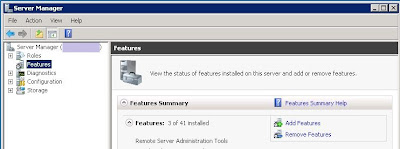
At the "Add Features Wizard" / "Select Features" dialog, in the list of features, locate and enable SMTP Server
At the "Add Features Wizard" / "Add role services ..." dialog, click "Add Required Role Services"

Back at the "Add Features Wizard" / "Select Features" dialog, click Next
At the "Add Features Wizard" / "Web Server IIS" dialog, click Next
At the "Add Features Wizard" / "Select Role Services" dialog, in the list of role services, click Next
Click "Install," wait for it to finish, and click "Close."

Start / All programs / Admin tools / Internet Information Services (IIS) 6.0 Manager

Expand local computer / right-click smtp virtual server / properties
At the SMTP Virtual Server dialog / Access tab / Authentication
Uncheck anonymous, uncheck basic, enable Integrated windows authentication / OK
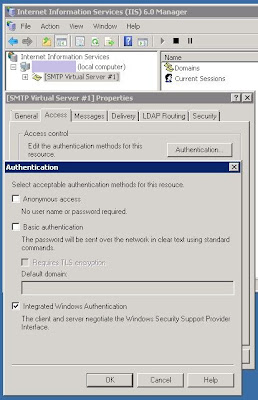
At the SMTP Virtual Server dialog / Messages tab
Keep or change the Badmail directory / OK

Expand local computer / smtp virtual server / highlight domains / right-click domain name on the right / properties
Keep or change the mailroot drop directory / OK
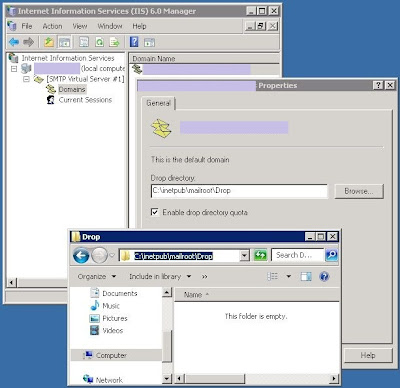
Make sure the SMTP service is set to start automatically:
Start menu / Administrative tools / Services

Find and right-click "Simple Mail Transfer Protocol" / Properties
General tab / Startup type: Automatic / OK

Launch SSMS
Click New Query, and execute this query:
--- start of query ---

Note: if you receive an error like "The affinity mask specified conflicts with the IO affinity mask specified. Use the override option to force this configuration", change the RECONFIGURE command to RECONFIGURE WITH OVERRIDE. I do not know how to correct the underlying error yet.
Run SSMS / Management / right-click Database Mail / Configure Database Mail

At the "Select Configuration Task," choose "Set up database mail..." / Next

When a developer runs sp_send_dbmail to email through this server, they will need to specify a profile name as a string.
For the Profile name:
The profile name can have letters, number, spaces, hyphens, etc.
I recommend keeping it short, and including the server name.
Example Profile name: "servername-db email"
At the SMTP accounts area, click Add
At the New Database Mail Account dialog
For the Account name:
This will distinguish identifying one smtp server from another.
Example Account name: "servername-db account"This will distinguish identifying one smtp server from another.
Database Mail will attempt to use each Account in this Profile until it succeeds.
For the Email address, Display name and Reply email:
Since it's not coming from a person, I recommend bounceback information: (do not include quotes)
Email address: "do-not-reply@organization.com"
Display name: "Big Organization"
Reply email: "do-not-reply@organization.com"
Server name: "localhost"
Enable Windows Authentication (since our SMTP virtual server is using Integrated windows authentication)
Click OK

At "Manage Profile Security," click Next
At "Configure System Parameters," click Next
At "Complete the Wizard," click Finish
At "Configuring," after the actions complete, click Close

Back at SSMS / Management / right-click Database mail
Click Send Test Email

Select your Database Mail Profile (perhaps "servername-db email")
To: recipient-email@organization.com
In the Subject field, I recommend appending a 1, 2, 3... in case you need to troubleshoot
At the Database Mail Test Email dialog, click OK.
You should recieve the email soon.

Another way to send email:
--- start of query ---

Slightly more complicated email:
--- start of query ---
To check for problems:
1. SSMS / Management / right-click Database mail / View Database Mail log
2. SSMS / new query, execute these queries:
Start / All programs / Admin tools / Server manager

In Server Manager, click Features / Add features (on the right)
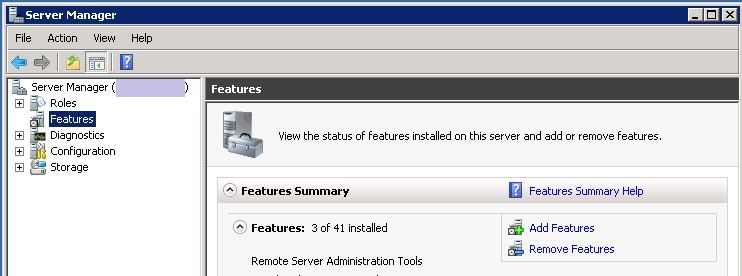
At the "Add Features Wizard" / "Select Features" dialog, in the list of features, locate and enable SMTP Server
At the "Add Features Wizard" / "Add role services ..." dialog, click "Add Required Role Services"

Back at the "Add Features Wizard" / "Select Features" dialog, click Next
At the "Add Features Wizard" / "Web Server IIS" dialog, click Next
At the "Add Features Wizard" / "Select Role Services" dialog, in the list of role services, click Next
Click "Install," wait for it to finish, and click "Close."

Start / All programs / Admin tools / Internet Information Services (IIS) 6.0 Manager

Expand local computer / right-click smtp virtual server / properties
At the SMTP Virtual Server dialog / Access tab / Authentication
Uncheck anonymous, uncheck basic, enable Integrated windows authentication / OK
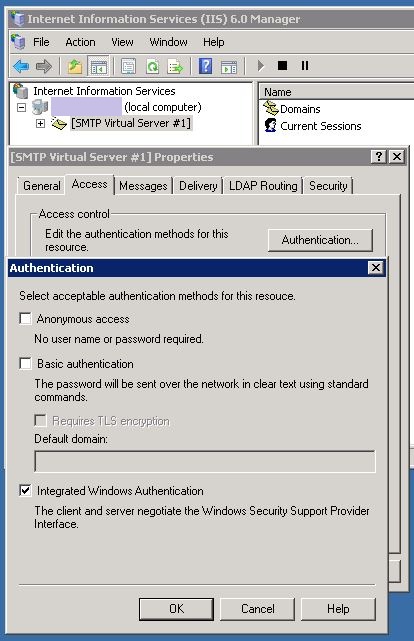
At the SMTP Virtual Server dialog / Messages tab
Keep or change the Badmail directory / OK

Expand local computer / smtp virtual server / highlight domains / right-click domain name on the right / properties
Keep or change the mailroot drop directory / OK
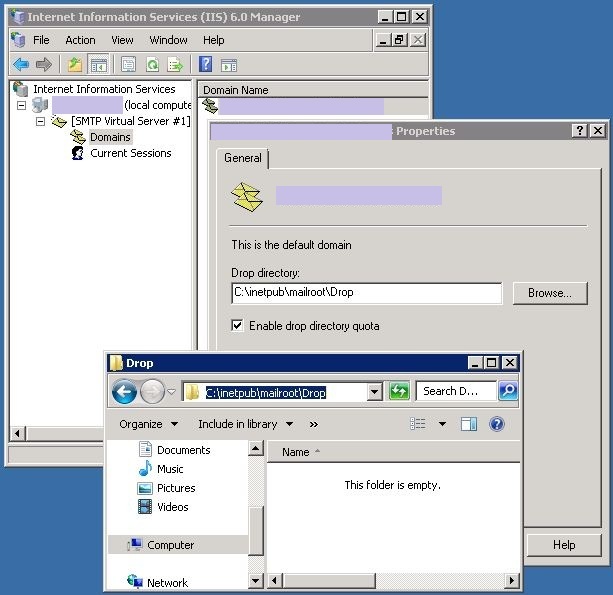
Make sure the SMTP service is set to start automatically:
Start menu / Administrative tools / Services

Find and right-click "Simple Mail Transfer Protocol" / Properties
General tab / Startup type: Automatic / OK

Launch SSMS
Click New Query, and execute this query:
--- start of query ---
sp_CONFIGURE 'show advanced', 1
GO
RECONFIGURE
GO
sp_CONFIGURE 'Database Mail XPs', 1
GO
RECONFIGURE
GO
--- end of query ---
Note: if you receive an error like "The affinity mask specified conflicts with the IO affinity mask specified. Use the override option to force this configuration", change the RECONFIGURE command to RECONFIGURE WITH OVERRIDE. I do not know how to correct the underlying error yet.
Run SSMS / Management / right-click Database Mail / Configure Database Mail

At the "Select Configuration Task," choose "Set up database mail..." / Next

When a developer runs sp_send_dbmail to email through this server, they will need to specify a profile name as a string.
For the Profile name:
The profile name can have letters, number, spaces, hyphens, etc.
I recommend keeping it short, and including the server name.
Example Profile name: "servername-db email"
At the SMTP accounts area, click Add
At the New Database Mail Account dialog
For the Account name:
This will distinguish identifying one smtp server from another.
Example Account name: "servername-db account"This will distinguish identifying one smtp server from another.
Database Mail will attempt to use each Account in this Profile until it succeeds.
For the Email address, Display name and Reply email:
Since it's not coming from a person, I recommend bounceback information: (do not include quotes)
Email address: "do-not-reply@organization.com"
Display name: "Big Organization"
Reply email: "do-not-reply@organization.com"
Server name: "localhost"
Enable Windows Authentication (since our SMTP virtual server is using Integrated windows authentication)
Click OK

At "Manage Profile Security," click Next
At "Configure System Parameters," click Next
At "Complete the Wizard," click Finish
At "Configuring," after the actions complete, click Close

Back at SSMS / Management / right-click Database mail
Click Send Test Email

Select your Database Mail Profile (perhaps "servername-db email")
To: recipient-email@organization.com
In the Subject field, I recommend appending a 1, 2, 3... in case you need to troubleshoot
At the Database Mail Test Email dialog, click OK.
You should recieve the email soon.

Another way to send email:
--- start of query ---
exec msdb.dbo.sp_send_dbmail
@profile_name='servername-db email' /* type your database profile */
,@recipients='recipient-email@organization.com'
,@subject='Test message 2'
,@body='This is the body of the test message.
Database Mail Sent Successfully.'
--- end of query ---
Slightly more complicated email:
--- start of query ---
declare @strBody varchar(150)
set @strBody='Database Mail works on '+@@servername+'.'
set @strBody=@strBody+ 'The time is '+cast(getdate() as varchar(20))
exec msdb.dbo.sp_send_dbmail
@profile_name='servername-db email' /* type your database profile */
,@recipients='to_recipient@organization.com'
,@copy_recipients='cc_recipient@organization.com'
,@from_address='from_sender@organization.com'
,@body_format='html' /* text or html, default is text */
,@subject='Database Mail 3'
,@body=@strBody
--- end of query ---To check for problems:
1. SSMS / Management / right-click Database mail / View Database Mail log
2. SSMS / new query, execute these queries:
select * from msdb.dbo.sysmail_mailitems order by send_request_date desc
select * from msdb.dbo.sysmail_log order by log_date desc
Wednesday, September 1, 2010
TSQL - Automate DB restore
This script restores a database without having to know the logical file names. It also lets you place the MDF, LDF and NDF files wherever you want them. I mainly use it to run a nightly restore on my local machine. The line with "business logic" does a quick test to see if the database has been changed at all. There's no need to restore a database if it hasn't been changed, so the "business logic" line is how I tell it to skip the restore step.
/* Automate restore w/o needing to know the logical file names. */
-- BEGIN - MODIFY THIS CODE - create a blank db
if not exists(select * from master.sys.databases where [name]='DBNAME')
begin
create database DBNAME
end
go
-- END - MODIFY THIS CODE - create a blank db
declare @strDatabase varchar(130)='DBNAME' -- MODIFY THIS LINE - db name
declare @strBackupFile varchar(500)='e:\docs\db-backups\dbname_backup_file.bak' -- MODIFY THIS LINE - source db backup file
declare @strRestoreMDFFilesTo varchar(500)='e:\docs\sqldata\default\' -- MODIFY THIS LINE - destination restore directory for main files
declare @strRestoreLDFFilesTo varchar(500)='c:\docs\sqldata\default\' -- MODIFY THIS LINE - destination restore directory for tlog files
declare @strRestoreNDFFilesTo varchar(500)='c:\docs\sqldata\default\' -- MODIFY THIS LINE - destination restore directory for non-main files
-- other variables used
declare @strSQL nvarchar(max)
declare @strOriginalPhysicalName varchar(150)
declare @strPhysicalName varchar(150)
declare @strLogicalName varchar(150)
declare @intReturn int
-- begin restoring
begin try
drop table #tmpFilelist
end try
begin catch
end catch
create table #tmpFilelist (
LogicalName varchar(64), PhysicalName varchar(130), [Type] varchar(1), FileGroupName varchar(64), Size decimal(20, 0)
,MaxSize decimal(25, 0), FileID bigint, CreateLSN decimal(25,0), DropLSN decimal(25,0), UniqueID uniqueidentifier
,ReadOnlyLSN decimal(25,0), ReadWriteLSN decimal(25,0), BackSizeInBytes decimal(25,0), SourceBlockSize int
,filegroupid int, loggroupguid uniqueidentifier, differentialbaseLSN decimal(25,0), differentialbaseGUID uniqueidentifier
,isreadonly bit, ispresent bit, TDEThumbpr decimal
)
if not exists(select * from DBNAME.sys.tables) -- MODIFY THIS LINE - business logic to see if we need to restore the database at all
begin
print 'Restoring '+@strDatabase+' db ...'
use master
exec msdb.dbo.sp_delete_database_backuphistory @database_name = @strDatabase
use [master]
exec('alter database '+@strDatabase+' set single_user with rollback immediate')
use [master]
exec('drop database '+@strDatabase)
insert into #tmpFilelist
exec('restore filelistonly from disk = '''+@strBackupFile+'''')
set @strSQL='restore database ['+@strDatabase+'] from disk='''+@strBackupFile+''' with '
set @strSQL=@strSQL+ 'file=1 '
set @strSQL=@strSQL+ ',nounload '
set @strSQL=@strSQL+ ',replace '
set @strSQL=@strSQL+ ',stats=10 '
while exists(select * from #tmpFilelist)
begin
select top 1 @strOriginalPhysicalName=PhysicalName, @strLogicalName=LogicalName from #tmpFilelist
set @strPhysicalName=@strOriginalPhysicalName
set @strPhysicalName=reverse(@strPhysicalName)
set @strPhysicalName=left(@strPhysicalName, charindex('\', @strPhysicalName)-1)
set @strPhysicalName=reverse(@strPhysicalName)
set @strPhysicalName=replace(@strPhysicalName, '.', '_'+@strDatabase+'.')
if @strPhysicalName like '%.mdf'
set @strPhysicalName=@strRestoreMDFFilesTo+@strPhysicalName
else if @strPhysicalName like '%.ldf'
set @strPhysicalName=@strRestoreLDFFilesTo+@strPhysicalName
else
set @strPhysicalName=@strRestoreNDFFilesTo+@strPhysicalName
set @strSQL=@strSQL+ ',move '''+@strLogicalName+''' to '''+@strPhysicalName+''' '
delete from #tmpFilelist where PhysicalName=@strOriginalPhysicalName
end
execute @intReturn=sp_executesql @strSQL
end
/* Automate restore w/o needing to know the logical file names. */
-- BEGIN - MODIFY THIS CODE - create a blank db
if not exists(select * from master.sys.databases where [name]='DBNAME')
begin
create database DBNAME
end
go
-- END - MODIFY THIS CODE - create a blank db
declare @strDatabase varchar(130)='DBNAME' -- MODIFY THIS LINE - db name
declare @strBackupFile varchar(500)='e:\docs\db-backups\dbname_backup_file.bak' -- MODIFY THIS LINE - source db backup file
declare @strRestoreMDFFilesTo varchar(500)='e:\docs\sqldata\default\' -- MODIFY THIS LINE - destination restore directory for main files
declare @strRestoreLDFFilesTo varchar(500)='c:\docs\sqldata\default\' -- MODIFY THIS LINE - destination restore directory for tlog files
declare @strRestoreNDFFilesTo varchar(500)='c:\docs\sqldata\default\' -- MODIFY THIS LINE - destination restore directory for non-main files
-- other variables used
declare @strSQL nvarchar(max)
declare @strOriginalPhysicalName varchar(150)
declare @strPhysicalName varchar(150)
declare @strLogicalName varchar(150)
declare @intReturn int
-- begin restoring
begin try
drop table #tmpFilelist
end try
begin catch
end catch
create table #tmpFilelist (
LogicalName varchar(64), PhysicalName varchar(130), [Type] varchar(1), FileGroupName varchar(64), Size decimal(20, 0)
,MaxSize decimal(25, 0), FileID bigint, CreateLSN decimal(25,0), DropLSN decimal(25,0), UniqueID uniqueidentifier
,ReadOnlyLSN decimal(25,0), ReadWriteLSN decimal(25,0), BackSizeInBytes decimal(25,0), SourceBlockSize int
,filegroupid int, loggroupguid uniqueidentifier, differentialbaseLSN decimal(25,0), differentialbaseGUID uniqueidentifier
,isreadonly bit, ispresent bit, TDEThumbpr decimal
)
if not exists(select * from DBNAME.sys.tables) -- MODIFY THIS LINE - business logic to see if we need to restore the database at all
begin
print 'Restoring '+@strDatabase+' db ...'
use master
exec msdb.dbo.sp_delete_database_backuphistory @database_name = @strDatabase
use [master]
exec('alter database '+@strDatabase+' set single_user with rollback immediate')
use [master]
exec('drop database '+@strDatabase)
insert into #tmpFilelist
exec('restore filelistonly from disk = '''+@strBackupFile+'''')
set @strSQL='restore database ['+@strDatabase+'] from disk='''+@strBackupFile+''' with '
set @strSQL=@strSQL+ 'file=1 '
set @strSQL=@strSQL+ ',nounload '
set @strSQL=@strSQL+ ',replace '
set @strSQL=@strSQL+ ',stats=10 '
while exists(select * from #tmpFilelist)
begin
select top 1 @strOriginalPhysicalName=PhysicalName, @strLogicalName=LogicalName from #tmpFilelist
set @strPhysicalName=@strOriginalPhysicalName
set @strPhysicalName=reverse(@strPhysicalName)
set @strPhysicalName=left(@strPhysicalName, charindex('\', @strPhysicalName)-1)
set @strPhysicalName=reverse(@strPhysicalName)
set @strPhysicalName=replace(@strPhysicalName, '.', '_'+@strDatabase+'.')
if @strPhysicalName like '%.mdf'
set @strPhysicalName=@strRestoreMDFFilesTo+@strPhysicalName
else if @strPhysicalName like '%.ldf'
set @strPhysicalName=@strRestoreLDFFilesTo+@strPhysicalName
else
set @strPhysicalName=@strRestoreNDFFilesTo+@strPhysicalName
set @strSQL=@strSQL+ ',move '''+@strLogicalName+''' to '''+@strPhysicalName+''' '
delete from #tmpFilelist where PhysicalName=@strOriginalPhysicalName
end
execute @intReturn=sp_executesql @strSQL
end
Subscribe to:
Posts (Atom)